Broadband and Mobile Connectivity Before Leasing a Bangalore Commercial Space
Published
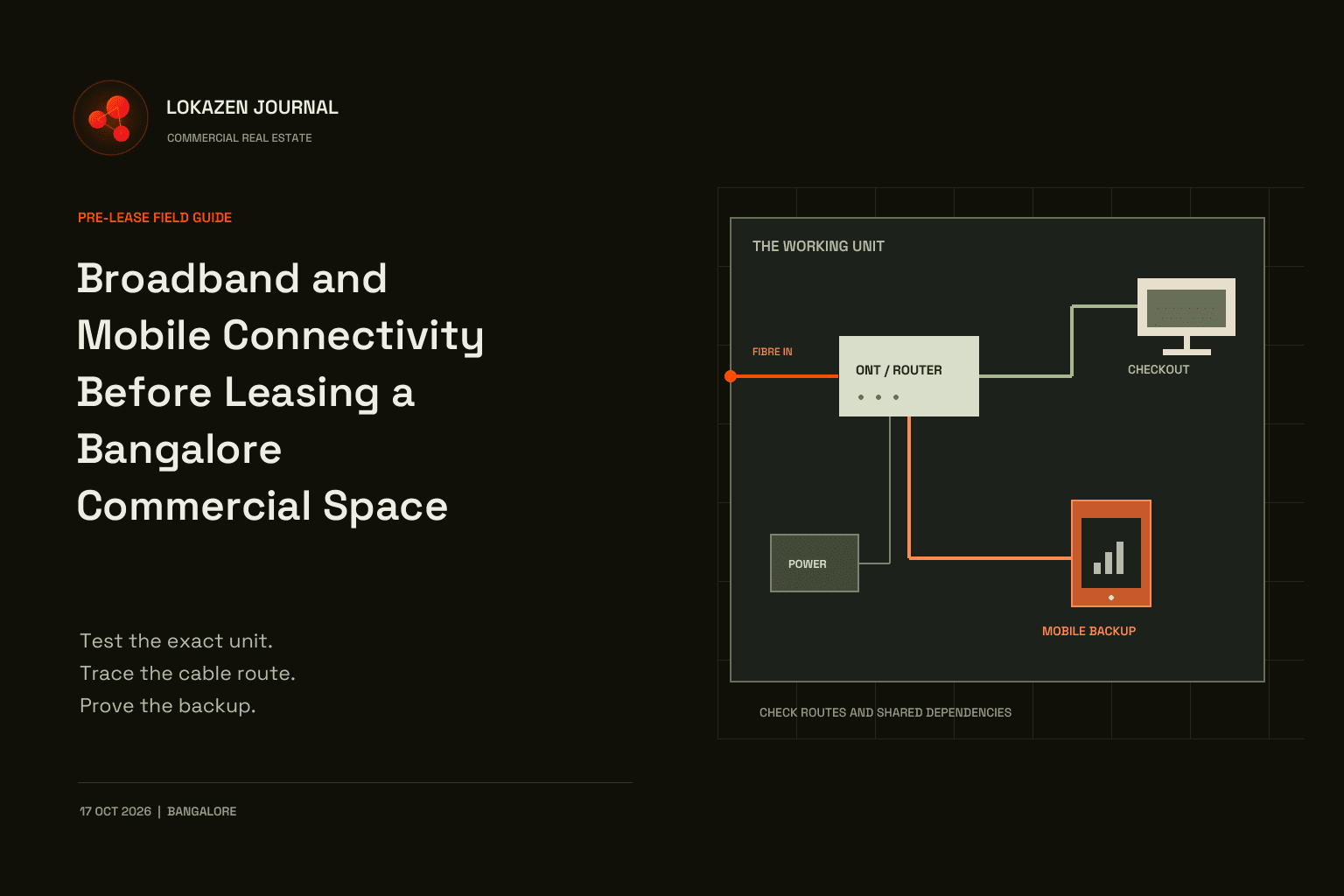
Editorial illustration. Not a listed property, verified location or measured layout.
A commercial unit can look ready for trading while its checkout counter has weak mobile reception and no usable broadband connection. Before committing to a Bangalore shop, restaurant or office, verify connectivity at the exact premises, agree the installation route and test how essential work continues during an outage.
This is a practical pre-lease inspection guide. It does not rank providers or prescribe one internet speed for every business. Your application vendors, operating pattern and site tests should determine the specification. Include connectivity alongside rent, access and fit-out when comparing commercial spaces with Lokazen.
Start with the work that must stay online
List what happens during your busiest operating period. A restaurant may need order tablets, cloud billing, payment terminals and a manager's phone at the same time. A showroom may depend on stock lookup and customer appointments. An office may need video calls, large uploads and remote access. Count concurrent activities rather than simply counting devices.
Ask each application supplier about supported connections, offline behaviour, upload needs, network restrictions and reconnection. Do not assume that an app which opens offline can complete and reconcile a sale offline. Record which functions can pause and which interrupt trading immediately.
| Business activity | What to establish | What to demonstrate |
|---|---|---|
| Billing and payments | Vendor-supported network and offline process | A permitted test workflow and clear confirmation of its status |
| Online orders | Alert, acceptance and printing dependencies | An approved test order reaching the intended station |
| Stock and administration | Sync, login and remote-access requirements | Lookup and update using a safe demonstration account |
| Staff calls | Calling locations and required operators | Calls from counter, back room and office |
| Guest Wi-Fi | Separate access and capacity controls | Business devices remain usable while guests connect |
Use vendor demonstration modes or other expressly approved tests. Never create real charges, customer orders or stock changes merely to inspect a property. Keep credentials, customer information and payment details out of the inspection record.
Confirm service at the exact unit
An advertisement saying a provider serves Indiranagar or Whitefield does not establish that it can activate your floor and unit. Ask for a feasibility check against the full installation address, including entrance, floor and unit identifier. Confirm whether the proposed service is wired fibre or fixed wireless, and whether the selected product permits your intended business use.
Airtel's broadband support page explicitly makes connectivity subject to on-ground feasibility at the installation address. Jio's installation FAQ also describes a location feasibility check. These consumer pages illustrate why locality-level availability is insufficient; they do not establish commercial eligibility or terms for your unit.
Request a written site-survey outcome: service type, available connection point, cable route, equipment location, outstanding permissions, chargeable work and expected activation sequence. Ask whether port availability has actually been checked. A salesperson's estimate is a planning input, not an activation guarantee.
Separate the internet service from the internal network. The provider's external connection is one component; cabling, switches and Wi-Fi inside the unit are others. A poor Wi-Fi result can arise inside the premises even when the incoming line is working. A good Wi-Fi signal can exist while the internet service is down.
Measure inside the premises
Walk the actual operating layout with the devices and mobile networks you expect to use. Test at the payment counter, kitchen order station, storage area, mezzanine and staff office. Check with shutters and doors in their normal operating positions, without compromising ventilation, safe access or anyone's use of the building.
Record the date, time, exact test point, operator, device and whether the device used mobile data or Wi-Fi. When testing mobile reception, turn Wi-Fi off so an unnoticed connection does not conceal a weak mobile link. Repeat during a representative busy period if access allows. One successful midday test is limited evidence for evening service.
Capture successful and failed calls, application response, latency, upload and download results where appropriate. Signal readings can help a technician investigate, but bars and isolated numbers are not acceptance criteria by themselves. Use the same test method for comparable units and retain failures alongside successes.
If existing broadband is available with permission, compare a wired test near the incoming equipment with a Wi-Fi test at the working position. This helps distinguish a service problem from an internal coverage problem. If no connection exists, mark broadband performance as untested; another tenant's result is not your unit's commissioning evidence.
Agree the cable route and equipment space
Walk from the building's telecom entry point to the proposed optical network terminal, or ONT, where fibre service terminates. It may be combined with the router. Identify risers, conduits, locked rooms and penetrations before the fit-out closes access. Ask the landlord or building manager who can approve each part of the route and who will open shared areas for installation or repairs.
Get written agreement on permitted drilling, cable supports, roof access if relevant, reinstatement, contractor supervision and working hours. Have qualified contractors address electrical work and fire-stopping. Do not treat permission from a letting representative as approval from every person responsible for common areas.
Choose a dry, ventilated, accessible position for network equipment, protected from kitchen heat, cleaning water and accidental unplugging. Plan power sockets and wired runs to fixed operational devices where suitable. Access-point positions should follow the layout and a coverage check, rather than the nearest spare socket. Equipment in a rear metal cabinet may be tidy but still need separate access points.
Check what the backup actually bypasses
Two subscriptions do not necessarily provide two independent paths. Providers may use the same building entrance, duct, power supply or other shared infrastructure. A second service can improve resilience without protecting against every failure. Ask what is known and label what remains unverified.
| Failure to consider | Question for the site team | Practical evidence |
|---|---|---|
| Incoming cable damage | Do primary and backup share the entry or route? | Route drawings and provider confirmation where available |
| Unit power loss | Which ONT, router, switch and access points need backup power? | Equipment list and supervised power-backup test |
| Building equipment outage | Is shared telecom equipment powered and accessible? | Building responsibility and maintenance records |
| Primary service loss | Does switching connections restore critical applications? | Timed, approved failover and recovery test |
| Weak mobile backup | Does it work at the installed backup device location? | Repeat tests on that device and operator |
A mobile backup may bypass a damaged fibre lead-in, but its performance still needs testing. Another SIM from the same underlying network may share important failure risks. Even a different operator cannot be described as fully independent without evidence about shared dependencies.
Ask a competent installer to size power backup for the equipment that must remain on, with realistic runtime and maintenance needs. Keeping only the router powered will not help if a separate ONT or required switch loses power. Local backup power also cannot guarantee that upstream provider equipment stays available.
Test switching back as well as switching away. Applications may need to reconnect, reauthenticate or reconcile pending work. Agree a staff procedure for uncertain payment or order status so retries do not create duplicate transactions. Confirm the procedure with the relevant vendor.
Worked example one: a small cafe
This example is fictional. A cafe plans one billing station, two order tablets and guest Wi-Fi. Its first visit shows usable mobile data near the front door but repeated failed calls in the rear office. The owner initially considers using a spare phone as the only backup.
The team maps the equipment positions and requests unit-level fibre feasibility. It asks the billing and ordering vendors which workflows survive connection loss. The landlord approves an identified cable path and an accessible equipment shelf, subject to the building's contractor process.
Before opening, the installer tests a dedicated mobile backup device in its intended position. The cafe separates guest access from operational devices and runs a vendor-approved outage exercise. The exercise reveals that one order tablet reconnects only after staff reopen its application.
The decision is conditional: proceed only after the cable route, activation dependencies and backup test are resolved. Record the tablet recovery step in the operating checklist. The result is a demonstrable recovery process, not a claim that the cafe can never lose an order.
Worked example two: an upstairs showroom
This example is also fictional. An upstairs showroom uses cloud stock lookup and scheduled video consultations. Two broadband providers say they serve the building. Both proposed cables enter through the same accessible front conduit, while indoor mobile tests vary across the showroom.
The team recognises that two bills would not protect against damage to that shared conduit. It asks whether an alternative route is feasible and permitted. The building manager cannot yet confirm access to the necessary riser, so route diversity remains unresolved rather than being assumed.
The showroom compares the units using a practical operating fallback: limited stock enquiries by phone, consultations moved only with customer agreement, and a tested mobile connection at an approved equipment position.
If consultations cannot tolerate that fallback, the unresolved route becomes a reason to defer commitment or choose another unit. A technically possible connection is insufficient when the business cannot operate within its likely recovery constraints.
Turn findings into a pre-lease decision
Put the evidence beside the commercial comparison. Identify who pays for the provider connection, internal cabling, approved building work, backup equipment and ongoing service. Ask for applicable charges and written terms directly; a headline monthly price may omit work specific to the premises.
Agree how installation dependencies affect your proposed opening sequence. Where commitments, access rights or remedies belong in the lease, have your adviser document them appropriately. This checklist is operational guidance, not a substitute for site-specific technical or legal advice.
Use this close-out checklist before treating connectivity as ready:
- Exact unit and intended business use checked with the proposed provider
- Survey outcome and outstanding permissions recorded
- Critical workflows and vendor requirements documented
- Indoor mobile results logged at actual working positions
- Cable route, equipment space and power arrangements approved
- Shared dependencies and unverified backup assumptions identified
- Activation, failover and recovery tests assigned to named owners
- Support contacts, account ownership and fault-reference process accessible to staff
Ask the building manager whether a digital connectivity rating exists and what premises and date it covers. TRAI's rating FAQ describes a voluntary framework covering matters including indoor coverage, infrastructure and redundancy. A rating is useful evidence, but it does not replace testing your intended unit and workflow. Consult the current rating-manual page rather than relying on an older downloaded version.
For help incorporating these findings into your location shortlist, contact Lokazen. Bring the unit plan and unresolved dependencies so the property discussion can address specific constraints.
Sources and scope
Primary sources reviewed on 17 October 2026 IST: Airtel broadband support, Jio's installation FAQ, TRAI's digital connectivity rating FAQ and the current TRAI rating-manual index, linked above. Provider products and site conditions can change; obtain current written terms for the actual commercial premises. The inspection steps and both fictional examples are editorial guidance, not provider commitments, survey results or regulatory certification.
Frequently asked questions
- Is neighbourhood broadband availability enough before signing a lease?
- No. Confirm feasibility for the exact address, floor and unit, including connection capacity, routing and permissions. Record any unresolved installation dependencies before relying on an activation estimate.
- What internet speed should a commercial unit have?
- There is no universal figure. Collect application requirements, concurrent usage and upload needs, then test representative workflows. Stability, recovery and the internal network matter alongside the advertised download speed.
- Can I rely on mobile signal bars during a viewing?
- Use them only as an initial observation. Test calls and data on the intended operator and device at working positions, with Wi-Fi off for mobile tests. Repeat under representative conditions where possible.
- Does a second provider guarantee independent backup?
- No. Check shared cable routes, building equipment and power dependencies. Record which failures the second connection can bypass and which remain possible. Do not label an unverified route independent.
- Will a router UPS keep the business online?
- Only if all required local equipment remains powered and the upstream service still works. Include separate ONTs, switches and necessary access points in the assessment, and test the intended runtime safely.
- Is a TRAI digital connectivity rating compulsory for every shop?
- TRAI's published FAQ describes its rating framework as voluntary. If a building has a rating, check its scope and currency. It does not establish your provider's service terms or guarantee application performance.
- When should connectivity be tested again?
- After installation and fit-out, before opening, and after relevant changes to layout, equipment or service. Agree ongoing checks with the operator and installer, especially after an outage exposes a recovery problem.
Read next
- Playbook
Pest Risk Before Leasing a Bangalore Commercial Space
13 min read
- Playbook
Waste Storage and Collection Before Leasing a Bangalore Restaurant
10 min read
- Playbook
Noise and Neighbour Compatibility Before Leasing a Bangalore Commercial Space
10 min read
- Playbook
How to Check Electrical Capacity Before Leasing a Bangalore Shop or Restaurant
10 min read
- Playbook

The Property Owner's Playbook: Leasing Your Bangalore Commercial Space the Right Way
20 min read
- Playbook

Comparing Commercial Fit Out Quotations in Bangalore
10 min read
Work with Lokazen
Brands get scored Bangalore shortlists from verified listings. Owners get their space in front of brands that are actively looking.
More data-led guides on the Lokazen blog.